Organization Tips · 6 min read
How to organize by location instead of category
Organizing by location means recording where an item actually lives, such as Garage → Shelf 3 → Bin 8142, instead of making it fit a category like Tools. It may work better for mixed or changing storage because you can find belongings without sorting everything first. Keep categories as optional tags when they help.
This guide is for households, crafters, and makers whose belongings end up in mixed drawers, project boxes, or temporary storage. You will learn when a location-based approach helps, when categories remain useful, and how to try both without reorganizing your whole space.
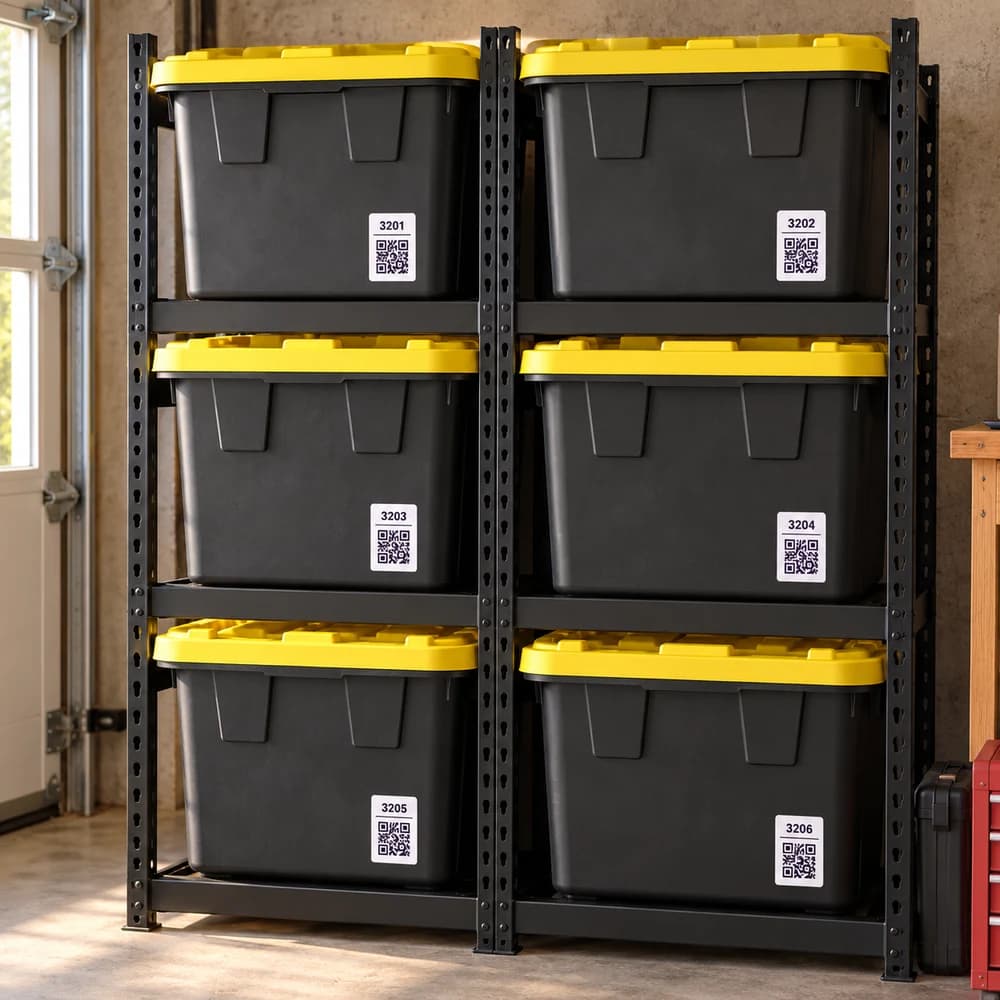
What does it mean to organize by location?
Organizing by location means using the actual storage spot as the main reference for finding a belonging. The record answers “Where is it now?” before asking which group it belongs in.
A place could be Hall Closet Top Shelf, Workbench Left Drawer, or Blue Box 12. You can keep the contents as they are and record them with a photo, item names, or both.
In Binly, this is a way to build a memory of your storage, not a requirement to change it. Place names stay stable while contents change. A label for Shelf 3 can still be useful after the camping gear gives way to holiday decorations.
Why might location-based organization work better for mixed storage?
Location-based records can help when several categories share one spot or when an item has several plausible categories. Recording the real place avoids having to settle the category question before you can remember where it is.
Consider an extension cord used for a sewing project, outdoor lights, and workshop tools. Putting it under Electrical, Crafts, or Seasonal describes a use; “Garage Shelf 3, Bin 8142” gives you somewhere specific to look.
This approach depends on keeping the recorded place current. A precise old location is still wrong after an item moves. Use it when capturing and updating a real place feels easier than maintaining separate category containers.
What is the difference between organizing by location and by category?
Location tells you where to retrieve something; category tells you what kind of thing it is. Either can be useful, and you can combine physical places with category tags instead of choosing one system for every belonging.
| Question | By location | By category |
|---|---|---|
| What does the name describe? | A real spot: Workbench Left Drawer | A group: Fasteners |
| What if one box holds mixed belongings? | Record each belonging in the same place. | Use several categories, or separate the contents if that helps. |
| What if contents change? | Keep the place name; update photos and item records. | Check whether the category label still fits. |
| Where can it help? | Moving boxes, mixed drawers, seasonal overflow | Frequently used supplies you prefer to keep together |
| What still needs upkeep? | The item's current place | Category membership and the physical storage location |
Categories can be the better physical choice when they support how you work: paints beside the easel, sewing thread near the machine, or matching fasteners in separate drawers. Location records can describe those same drawers.
How do I start organizing by location without moving everything?
Choose one existing storage spot, give it a recognizable place name, and record its contents before changing anything. Test whether the record leads you back to a belonging, then decide whether more detail would help.
Step 1: Pick a spot you often search
Use a drawer, a shelf, or one moving box. Choose a manageable place that contains something you will want again.
Step 2: Name the physical place
Use Hall Closet Top Shelf rather than Miscellaneous. For several similar containers, use distinct identifiers such as Bin 12 and Bin 13 so you can tell them apart.
Step 3: Record what is actually there
Take a photo that shows recognizable belongings. In Binly, save a place photo for visual reference or create named items if you want to find individual belongings by keyword.
Step 4: Add only useful layers
If “Bin 12” is hard to find on its own, record the parent places: Home → Garage → Shelf 3 → Bin 12. Skip layers that do not help you navigate the physical space.
Step 5: Try a retrieval and update moves
Look for one recorded item, follow the path, and check that it is there. When you move it to another place, update the record so the next retrieval reflects the change.
If you are new to the app, follow how to get started with Binly to create your first inventory and place.
How would location-based storage work in a real garage?
A garage container can hold several types of belongings while keeping one stable name. For example, call a container Bin 8142 and record it under Garage → Shelf 3, with an extension cord, paint roller, and spare cable inside.
This worked example shows the difference between a place and a category; it is not a measured customer outcome. A physical label reading “Electrical” would not describe the paint roller, but “Bin 8142” still identifies the correct container.
- To find the cord: search its saved item name and follow its recorded place.
- To inspect the container: open the place or scan its optional QR label to view the saved contents.
- When the roller moves: change its recorded place to the destination, then refresh a place photo if the old image would be misleading.
- To group belongings by use: add tags such as Painting or Electrical without moving everything into separate containers.
Can I keep categories while organizing by location?
Yes. Use places for the physical route and categories or tags for cross-cutting groups. A craft supply can live in Closet Drawer 2 and have tags for Sewing and Travel Kit.
In Binly, collections group items by tags without changing their physical places. That lets you view related belongings stored in several rooms while preserving the route to each one.
Keep a category container if it already works for you. The aim is to make belongings findable, not to replace useful habits with a new rule.
If you want to change the physical setup, try a container boundary for one crowded shelf, or compare visible and hidden storage. Both are optional; you can record where belongings live before deciding whether to move them.
What mistakes make location-based organization less useful?
Vague names, outdated locations, and photos that hide the contents make location records harder to trust. Give each place a recognizable identity and update the record when real storage changes.
- Calling several places “Miscellaneous”: use a physical name and a distinct container identifier.
- Photographing only a closed box: add a view of the contents so you can recognize belongings later.
- Recording only “Garage”: add a shelf or container when the room is too broad to guide retrieval.
- Leaving a moved item in its old place: update the destination in Binly; the app does not detect physical moves.
- Adding too much structure: stop at the smallest amount of detail that gets you to the right spot.
If a record fails a retrieval test, correct that one location or photo first. You do not need to reorganize the whole space to fix a single unreliable record.
What are the most common questions?
These answers cover the practical choices you can make before expanding your setup.
Is organizing by location always better than organizing by category?
No. Location records can help with mixed or changing storage, while category containers may suit supplies you use together. Choose the approach that makes retrieval easier in your actual space.
Do I need to reorganize before using Binly?
No. Record a useful photo and the place where belongings already live. You can change the storage later if you want, then update the records to match.
What should I call a box with unrelated things inside?
Use a distinct place name such as Blue Box 12, and record where that box lives. Keep descriptions of the contents in photos, item names, or tags so the box name can stay useful as contents change.
What if the same type of item is stored in several rooms?
Record each item's actual place instead of assuming the category has one location. In Binly, shared tags and collections can group related items while keeping their separate place paths.
Can I use location-based records for moving boxes?
Yes. Give each box a distinct identifier and save photos of its contents. Update its parent place or destination when it moves so the record describes the current location.
Do QR labels know what is currently inside a container?
A QR label opens the saved record for its place; it does not sense the contents. Update the photos and item locations when the contents change so a scan gives you useful information.
For current plans and limits, see Binly pricing.
What should I do next?
Try one mixed drawer or box. Give it a stable place name, save a useful photo, and test finding one belonging. Keep the categories that help and add location records where they make retrieval easier.
Start with one placeKeep reading: How to get started with Binly.